Fly From the Sun All the Way to Andromeda — NULLSPACE
Leave the solar system and drift into interstellar space, right in your browser. Planets placed by real catalog coordinates, nebulae and galaxies drawn to match Hubble and ESO photos — NULLSPACE.
There are plenty of night-sky apps. They name the constellations, show you where the planets are, zoom in like a telescope. But all of them share one viewpoint — you, standing on the ground, looking up.
I wanted the other view. Turn your back on Earth, pass the Sun, skim past Jupiter, and keep going until you fall out into interstellar space. Fly far enough that Andromeda stops being a dot and becomes a spiral that fills the screen.
There wasn’t anything I could just leave running and drift around in like that. So I built it. It’s called NULLSPACE.
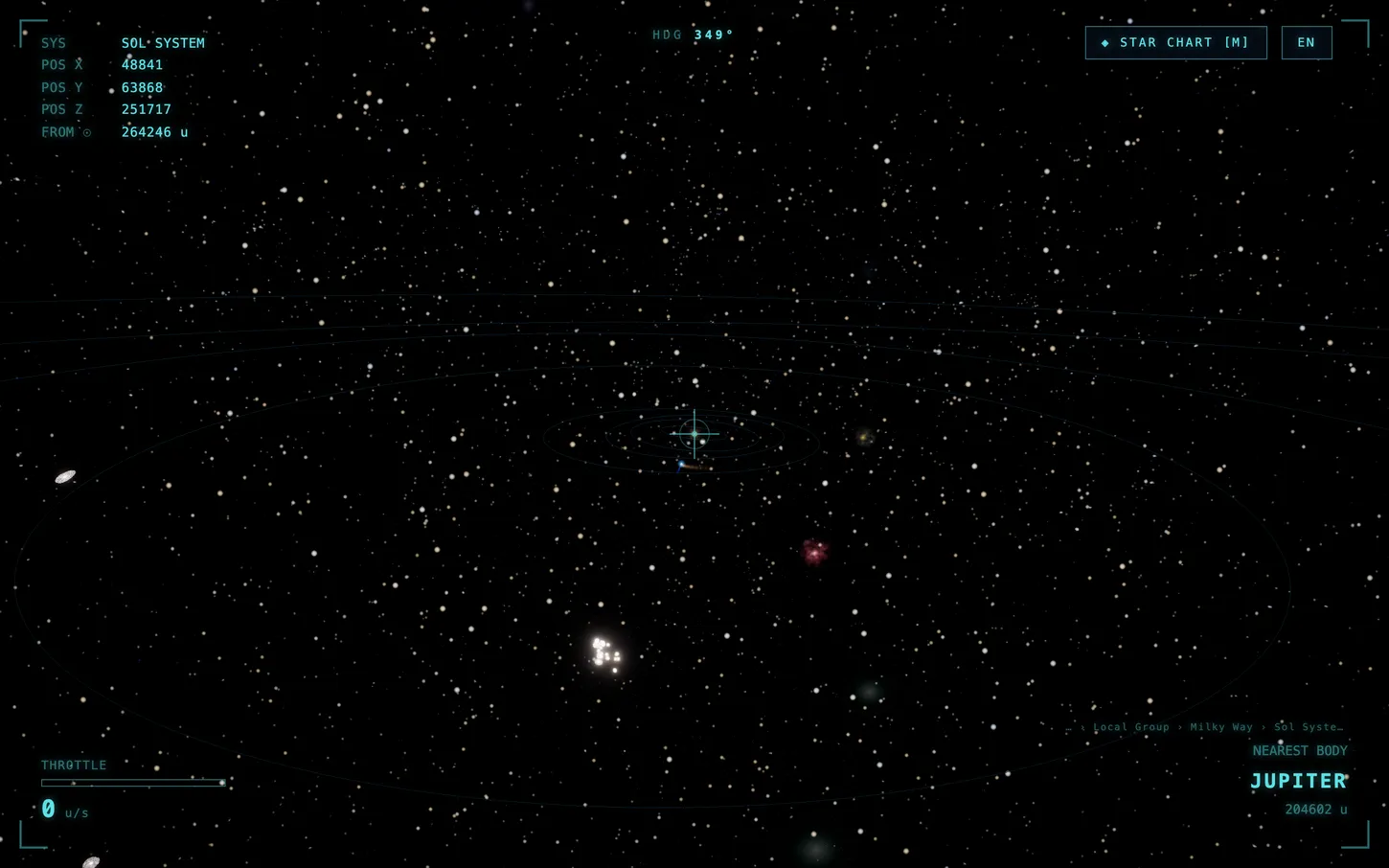
NULLSPACE is an interstellar navigation simulator that runs in your browser. No install, no login. Open the link and you’re already sitting in the cockpit; push the throttle and you leave the solar system.
Calling it a game would be a stretch — there’s no objective. No score, no missions, no enemies. Flying through space is the whole thing. The corners of the screen show your coordinates (POS X/Y/Z), distance from the Sun, and the nearest body, and every time you cross a boundary — SOL SYSTEM → OUTER REACHES → INTERSTELLAR — the HUD tells you.
The coordinates are real
Planet positions aren’t dropped in arbitrarily. They’re computed with astronomy-engine from the actual orbital positions at this exact moment. Where Mars sits in tonight’s real sky matches where Mars sits in the simulator. Pause time (P) or let it run, and the planets move at their true orbital speeds.
Stars and exoplanets use real catalog values too. Click a body and you get measured data — diameter, surface temperature, mass, rotation period — and for distant objects, right ascension (RA), declination (Dec), and apparent magnitude. A single star in Cancer, a single confirmed exoplanet — the coordinates are live.
That said, the scale is an honest compromise. At true ratios, planets become invisible specks and the nearest star is a lifetime away. So planets are scaled up to be visible, and interstellar distances are compressed. It’s a deliberate trade between realistic placement and distances you can actually traverse. This is less an astronomy textbook than a tool for feeling the scale of space.
Get close and it becomes a photograph
The distant nebulae and galaxies aren’t schematic point-clouds. They were drawn with real telescope photographs sitting right next to the screen.
- Nebulae — Orion (M42), Helix (the Eye of God), Carina, Lagoon, Eagle. The colors and shapes from the original Hubble, JWST, and ESO images — Orion’s fish-mouth dark bay, the Helix’s teal ring and red outer halo, Carina’s dust pillars — are reproduced in shaders.
- Galaxies — Andromeda, Triangulum (M33), Whirlpool (M51), Pinwheel (M101), Sombrero, Bode. The swept arms of grand-design spirals, pink star-forming regions, dust lanes — all matched to the photos. Edge-on galaxies like the Sombrero come out as a thin glowing line and a dust band, exactly side-on.
Each body’s color, size, and form is grounded in a reference document that cross-checks Wikipedia infoboxes (citing SIMBAD/Gaia) against NASA, ESA (Hubble), and ESO imagery. Not “something that looks vaguely like space” — it starts from the actual photograph of that object.
There are exotic objects too — a pulsar (neutron star) 6,500 light-years out, and the black hole at the center of our galaxy, 26,000 light-years away.
Two ways to fly
There are two ways to move.
Free flight. WASD for accelerate, reverse, and roll; the mouse for heading. Shift for the booster, Space to brake. You hand-fly it. Spin the wheel and it zooms in like a telescope, pulling a distant object close.
Star Chart. Press M for a list of destinations — sorted by category: solar system, stars, constellations, exoplanets, clusters, nebulae, galaxies, all the way to superclusters. From there you pick one of two modes. Wormhole warps you to the destination instantly. Cruise auto-pilots you toward it. Hand-flying all the way to Andromeda is a long trip, but pick it on the chart and it takes you there.
There’s also a target mode (TAB) where you aim straight at a body and warp to it. On mobile you steer by dragging and apply thrust with on-screen buttons.
A universe you just leave on
NULLSPACE is free. All you need is a browser. It’s built with Three.js, runs on desktop and mobile, and supports English and Korean.
It isn’t a tool with a clear purpose. It’s the kind of thing you open when you’re worn out mid-work, to pass the Sun and fly off toward some random star. Good to leave running in the background, too.
You can fly right now → nullspace.somee4.com
If you liked it and want the universe to keep running, you can buy it a coffee → Support on Ko-fi