A Map That Shows Only the Chargers You Can Plug Into — Suchamap
A charging map for Tesla owners in Korea. Superchargers, Destination Chargers, and NACS rest-stop chargers on one map — with idle fees, parking costs, and access tips surfaced before you arrive.
The battery was at 15%. I knew there was a charger at the highway rest stop ahead. The problem was whether it was a charger my car could actually plug into.
Open the Tesla app and only Superchargers show up. The nearest one was 40km away. Open a general charging app and the rest stop chargers all appear — but from the pins alone, I couldn’t tell which ones were NACS and which were DC combo only. While I tapped through them one by one to check connector types, the battery dropped to 13%.
What I found when I arrived was a charger that needed an adapter. The adapter was at home.
Driving a Tesla in Korea, you actually have more charging options than you’d think. There are Superchargers, Destination Chargers at hotels and outlets, and lately some highway rest stops and operators have started installing NACS connectors. Places you can plug into directly, no adapter, keep growing.
But there was no map that showed all of this in one place.
Tesla’s navigation knows about Superchargers and Destination Chargers — and stops there. It doesn’t know about the new NACS chargers appearing at rest stops. General charging apps go the other way: they show every charger in the country — DC combo, AC three-phase, CHAdeMO, and NACS, all of it. The abundance was the problem. What a Tesla owner wants is “the places my car can plug into,” and filtering for that meant tapping each pin.
The Ministry of Environment’s EV portal has all the data. But it’s a database, not a map.
One thing was missing: a single map that pulls out only the places you can charge without an adapter — Superchargers, Destination Chargers, and NACS connectors — and layers them onto one view. Plus the things you wish you’d known before arriving: “turns out there’s an idle fee,” “you have to pay for parking separately.”
That didn’t exist, so I built it. That’s Suchamap.
You can tell from the pin alone whether you can plug in
Suchamap only puts on the map what a Tesla owner can actually use: Tesla Superchargers, Destination Chargers, and rest stops and operators with NACS connectors (NACS-only / DC combo + NACS). Chargers that need an adapter aren’t on the screen to begin with.
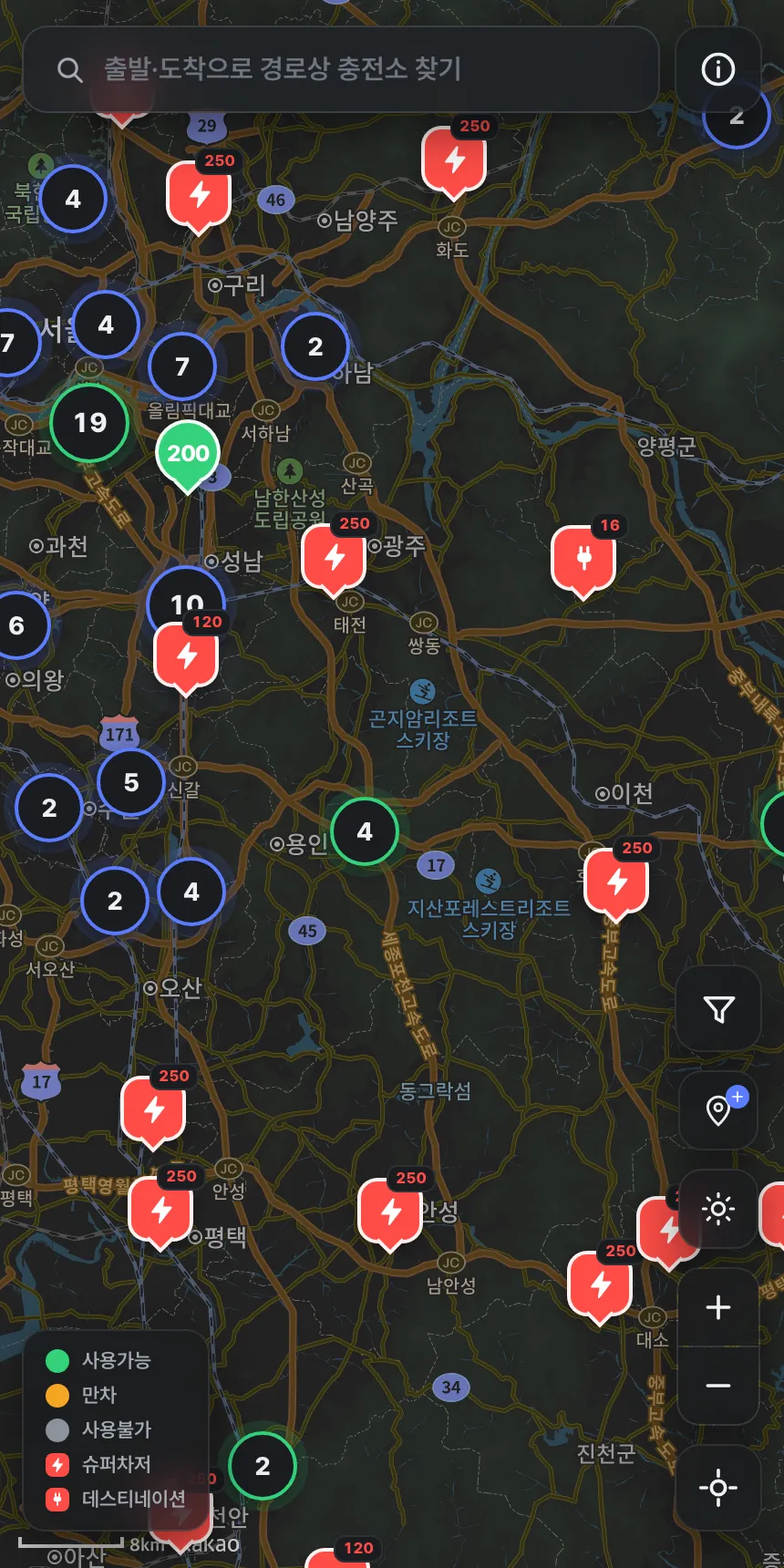
Pins carry information through color and shape. Tesla Superchargers and Destination Chargers are fixed to Tesla red, and the two are told apart by the glyph inside the pin — a bolt for Superchargers, a plug for Destination Chargers. NACS chargers, instead of red, change color by live status — 🟢 available (green), 🟠 occupied (amber), ⚫ unavailable or stale data (gray). The output (kW) sits on the pin as a badge. Shapes differ by type too, so nothing depends on color alone — it reads by form even with color vision deficiency.
Zoom out and pins group into clusters. Even looking at the whole country at once, you can see where the charging hubs are concentrated.
The things you need to know before you arrive
Tap a pin and a bottom sheet rises. Live status comes first, and curated information sits below it. That curation is where Suchamap diverges from other maps.
Idle fee. A Supercharger charges a per-minute idle fee if you don’t move your car after charging finishes. Suchamap shows each station’s idle fee as a per-minute rate (e.g. 500 won/min) up front. It cuts down on finding out — after you’ve paid — that “it was done charging and the per-minute meter was running.”
Charging rates. It displays Supercharger rates and per-operator NACS rates. Places that are free, like most Destination Chargers, are labeled free.
Parking / turnaround, access tips. Spots where the entrance is hard to find because it’s two floors underground, places that charge separately for parking, places open only at certain hours. You can’t tell from map coordinates alone — only someone who’s been there knows. Suchamap writes it onto the station card.
The route to the charger opens directly in TMAP, KakaoMap, or Naver Map. One button in the sheet hands you off to the navigation app you already use.
A map filled in by its users
The information you need before arriving ultimately comes from people who’ve been there. Suchamap has an anonymous reporting feature. If a rate changed, a parking policy shifted, or the entrance was confusing, you can report it right from the station card. No login, no personal info. Pick a field, write what changed, done.
The station data itself is built from the Korea Environment Corporation’s “EV Charging Station Information” (KOGL Type 1) and Tesla’s official information, and it’s continuously supplemented by user reports. When a new rest stop gets NACS, it lands in the data, and reports from people who’ve been there stack on top.
The map and routing use KakaoMap — the base most familiar for finding places in Korea.
Price and download
Suchamap is free. It doesn’t charge you to find chargers.
You can use it on the web right now → suchamap.somee4.com
The iOS and Android apps are currently in store review. Once they’re out, mobile-only features like routing and waypoints will work in the app too.
If you liked the map and want it to keep running, you can support it with a coffee → Support on Ko-fi